August 10, 2026
WhatsApp CRM Integration for Bilingual Practices
Use the WhatsApp Business API plus a CRM connector or Diazluna’s bilingual front-desk platform. Start by verifying your Meta Business Manager account, provisioning an API-enabled phone number, and connecting via your chosen method. If you hit phone-number porting, custom webhooks, or CRM custom objects, loop in IT before proceeding.
Quick-action checklist:
- Verify your Meta Business Manager account and complete Facebook Business verification to generate API credentials. Without this step, your integration options are limited to low-reliability third-party connectors.
- Provision or port an API-enabled phone number through Meta’s Cloud API or a Business Solution Provider (BSP). This number cannot already be active on the WhatsApp Business App.
- Connect via your chosen method (native CRM connector, Zapier/Make, or an inbox platform), map contact fields to E.164 phone format, and run an end-to-end test message before going live.
Key Takeaways
WhatsApp CRM integration requires the official Business API, Meta Business verification, E.164 phone-number mapping, and a clear choice between native connectors, middleware, or a managed bilingual platform like Diazluna.
| Point | Details |
|---|---|
| Start with Meta verification | Business Manager verification is required before any API credentials or reliable integration can be set up. |
| phone format is critical | Phone-number format mismatch is the most common silent failure; normalize all numbers before field mapping. |
| Match route to team size | Solo practices can use a native connector; multi-rep teams need a shared inbox platform with routing rules. |
| U.S. TCPA compliance applies | Store opt-in timestamp and source in the CRM from day one; Meta template approval does not replace TCPA consent. |
| Diazluna for bilingual practices | Diazluna provides managed WhatsApp provisioning, bilingual AI receptionist, and CRM sync in a single 30-day onboarding. |
Table of Contents
- What does WhatsApp CRM integration actually mean?
- How do you choose the right integration route?
- Step-by-step integration checklist you can hand to IT or a vendor
- What features should a working WhatsApp–CRM setup give you?
- What does this cost, and what U.S. compliance rules apply?
- How do you scale conversations without getting flagged as spam?
- Common setup failures and how to fix them
- How Diazluna integrates WhatsApp as a bilingual front desk
- What building bilingual front-desk integrations actually teaches you
- Diazluna handles the WhatsApp + CRM setup for bilingual practices
- Sources
What does WhatsApp CRM integration actually mean?
“WhatsApp CRM integration” gets used loosely, and the term covers three technically different setups. Knowing which one you are building determines every decision downstream.
WhatsApp Business App runs on a single phone or desktop and supports one user at a time. It has no webhooks, no API access, and no way to log conversations automatically to a CRM record. Fine for a solo operator answering a handful of messages a day. Not fine for a multi-rep practice or any team that needs conversation history in a CRM.
WhatsApp Business API (Cloud API) is the official path for businesses that need scale. It supports multi-agent inboxes, message templates, webhooks, and two-way CRM sync. Meta hosts the Cloud API directly, which removed the need to go through a BSP for basic provisioning, though BSPs still add value for managed onboarding and compliance support. Native CRM integrations like Zoho CRM’s WhatsApp module use this API layer and walk you through point-and-click configuration steps.
Connectors and middleware (Zapier, Make, inbox platforms like Respond.io) sit between the API and your CRM. They trade some depth for speed. Zapier and Make are fast to deploy and cover most field-sync needs, but platforms with REST APIs and webhooks give you deeper conversation-history fidelity and more granular routing logic.
- WhatsApp Business App: solo user, no API, no CRM sync. Best for freelancers or very small operations.
- WhatsApp Business API / Cloud API: multi-agent, webhooks, templates, full CRM sync. Required for any team setup.
- Connector/middleware: Zapier, Make, or an inbox platform layered on top of the API. Faster setup, some tradeoffs on history depth.
Pro Tip: Never use browser-extension integrations or unofficial WhatsApp hacks to connect to your CRM. They violate Meta’s terms of service and risk a permanent account ban. They also lack the webhook infrastructure needed for reliable two-way syncing.
How do you choose the right integration route?
The right route depends on three variables: team size, messaging volume, and how much engineering time you can spend.
Single-rep or very small practice (1–2 people, low volume): A native CRM connector or a simple Zapier workflow gets you running in a day. You get basic contact logging and outbound template sends without touching a webhook. A three-person dental office that wants appointment reminders and lead capture fits here.
Multi-rep practice or support team (3–15 people, moderate volume): You need a shared inbox so agents do not step on each other’s replies. An inbox platform (Respond.io, or a CRM with a built-in WhatsApp inbox module) handles conversation assignment and routing. This is the tier where most professional practices land.
High-volume notifications or multi-location clinic: Custom webhook-to-CRM flows or a BSP-managed setup. You are sending hundreds of templated messages per day, need SLA reporting, and likely have a developer or IT partner. A BSP adds managed compliance support and dedicated API throughput.
- Choose a native CRM connector when your CRM already has a WhatsApp module (Zoho, HubSpot, Salesforce) and your volume is moderate.
- Choose Zapier or Make when you need a fast bridge between a WhatsApp inbox platform and a CRM that lacks a native connector, and conversation-history depth is not critical.
- Choose an inbox platform with CRM sync when multi-agent routing, SLA tracking, and full conversation logs on contact records are non-negotiable.
- Choose a BSP or Cloud API provider when you need managed onboarding, compliance support, or high-volume throughput beyond what self-serve connectors handle.
For practices serving Hispanic clients, the routing decision carries an extra layer: WhatsApp penetration across Latin America is among the highest of any messaging platform globally, which means your Spanish-speaking clients are very likely already on WhatsApp. Bilingual routing is not optional for those practices; it is a conversion requirement.
Step-by-step integration checklist you can hand to IT or a vendor
This sequence covers the full technical path from zero to a verified, live integration. Hand it to your IT contact or implementation partner as-is.
- Verify Meta Business Manager. Log into Meta Business Manager, submit business documents, and complete Facebook Business verification. This generates the API credentials your entire integration depends on.
- Provision or port your phone number. The number must be API-enabled and cannot be active on the WhatsApp Business App. If porting an existing number, plan for a 24–72 hour window and involve IT.
- Request WhatsApp Business API access or use Cloud API provisioning. Through Meta’s developer portal, create a WhatsApp Business Account (WABA) and link it to your phone number.
- Choose your connector or inbox platform. Native CRM module, Zapier/Make, or an inbox platform. Configure OAuth permissions and grant the required API scopes.
- Configure webhooks. Set your webhook endpoint URL (must be HTTPS with a valid TLS certificate). Subscribe to the relevant webhook events:
messages,message_status,contacts. - Map contact fields. Phone numbers must be in E.164 format (e.g., +12025551234). Phone-number format mismatch is the single most common silent-failure in WhatsApp CRM setups. Map name, phone, conversation history, labels, and any custom fields your CRM uses.
- Set deduplication rules. Decide whether the CRM creates a new contact on first message or matches to an existing record by phone number. Test both paths.
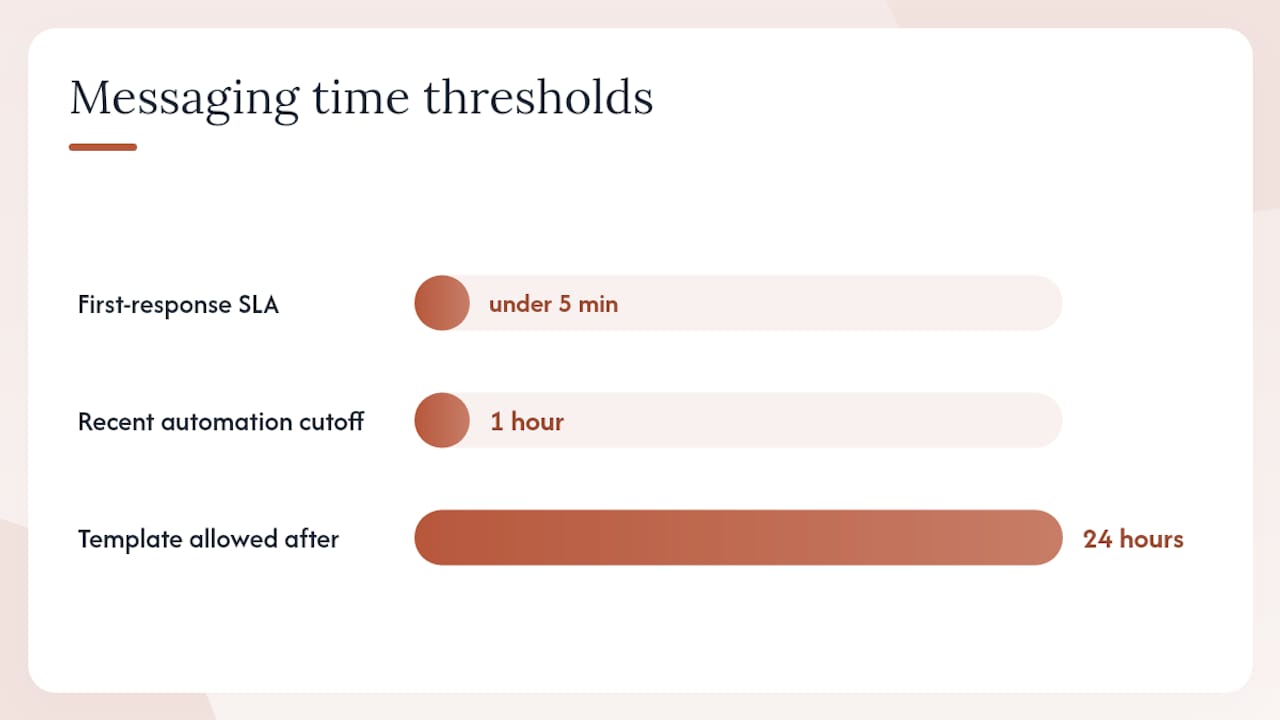
- Submit and get message templates approved. Templates must be approved by Meta before you can send outside the 24-hour conversation window. Submit at least one transactional template (appointment reminder, intake confirmation) before go-live.
- Run validation tests. Send a test message inbound, verify it appears on the contact record, reply outbound, and confirm the status update logs correctly.
IT requirements at a glance:
| Item | Requirement |
|---|---|
| Webhook endpoint | HTTPS, valid TLS certificate, publicly reachable |
| Phone number format | E.164 phone format for all CRM field mappings |
| OAuth scopes | whatsapp_business_messaging, whatsapp_business_management |
| Template approval | Submit via Meta Business Manager before go-live |
| Webhook events | Subscribe to messages, message_status, contacts |
Pro Tip: Run a deduplication test with a phone number that already exists in your CRM before going live. If your CRM creates a duplicate contact instead of matching the existing record, fix the deduplication rule first. Cleaning up duplicate records post-launch is far more painful than preventing them.
What features should a working WhatsApp–CRM setup give you?
After integration, these are the capabilities you should be able to verify. If a vendor or platform cannot check all of these boxes, ask specifically why before signing.
Core capabilities:
- Shared inbox with multi-agent support: Multiple team members can see and respond to conversations without collisions. Assignment and routing rules determine who handles which conversation.
- Message templates: Pre-approved templates for notifications outside the 24-hour window (appointment reminders, follow-ups, payment links). Contact name, phone, conversation history, and labels should all sync bidirectionally depending on connector capability.
- Automation and flows: Trigger CRM workflows from inbound WhatsApp messages (create a lead, update a pipeline stage, assign to a rep). Trigger WhatsApp messages from CRM events (appointment booked, form submitted).
- Conversation logging on contact records: Every message thread should appear on the CRM contact or deal record, timestamped and attributed to the agent who handled it.
- Two-way field sync: Changes to contact fields in the CRM (name update, status change) should reflect in the inbox platform, and vice versa.
- Analytics and reporting: Message volume, response time, template delivery rates, and conversation resolution rates. If your platform cannot report on response SLAs, you cannot manage them.
- Role-based access and audit logs: Agents should see only their assigned conversations. Admins need full audit logs for compliance and quality review.
For sales teams, the high-value triggers are inbound lead capture (a WhatsApp message creates a CRM contact and deal automatically) and pipeline-stage updates based on conversation outcomes. For support teams, the priority is ticket creation from inbound messages, SLA-based escalation, and automated follow-up sequences. For service businesses managing customer relationships, a unified inbox that ties conversation history to each customer record removes the manual work of cross-referencing chat logs and CRM notes.
What does this cost, and what U.S. compliance rules apply?
Cost components to budget:
- Cloud API / BSP fees: Meta’s Cloud API has no platform fee, but BSPs charge a monthly platform or seat fee. Expect $50–$300/month for a managed BSP depending on volume and support level.
- Per-conversation or per-template charges: Meta charges per conversation (a 24-hour window), with rates varying by conversation category (marketing, utility, authentication, service). Rates differ by country; U.S.-initiated conversations carry their own pricing tier.
- Connector subscription: Zapier or Make plans range from free tiers to $50–$100/month for business-level task volumes. Inbox platforms typically run $50–$200/month per seat.
- Implementation and engineering time: Budget 8–20 hours of developer or IT time for a custom webhook setup. Native CRM connectors cut this to 2–4 hours.
Compliance:
U.S. businesses sending WhatsApp messages for marketing or promotional purposes must treat those messages as subject to TCPA (Telephone Consumer Protection Act) requirements. Obtain explicit written consent before sending promotional messages, store the opt-in timestamp and source in your CRM, and honor opt-out requests immediately. Meta’s own template approval process does not substitute for TCPA compliance — both apply independently.
Meta also requires business verification before template approval, and every template must be submitted with a clear category (marketing, utility, authentication). Templates that mix promotional and transactional content are routinely rejected. Store opt-in records in a dedicated CRM field: at minimum, capture the opt-in date, the channel (WhatsApp), and the consent language the contact agreed to.
How do you scale conversations without getting flagged as spam?
The technical setup is the easier half. The operational changes are where most practices stumble.
Template governance:
- Classify every template before submitting it: transactional (appointment reminder, intake confirmation), utility (status update, payment receipt), or marketing (promotional offer, re-engagement). Meta reviews by category; mislabeled templates get rejected and slow your go-live.
- Assign one person as template owner. Every new template request goes through them before submission. This prevents agents from submitting redundant or off-brand variations.
- Review template performance monthly. Low delivery rates or high block rates signal that recipients are marking messages as spam, which damages your WhatsApp quality rating.
Bilingual workflow routing:
Routing Spanish conversations to bilingual agents or automated bilingual flows is not just a courtesy. High WhatsApp adoption among Hispanic audiences means a Spanish-speaking client who gets an English-only automated reply is likely to disengage entirely. Set a language-detection trigger in your inbox platform or CRM flow that routes based on the client’s preferred language, captured at intake. Keep translation consistent across templates, auto-replies, and agent responses. Inconsistent tone between an automated Spanish greeting and an English follow-up from a human agent creates friction that reduces conversions. For a deeper look at how bilingual follow-up sequences work in practice, bilingual client follow-up guidance covers templating and tone consistency in detail.
Automation guardrails:
- Use templates only for outside-the-24-hour-window messages. Inside the window, conversational replies do not require pre-approved templates, but they should still follow a response SLA (target: under 5 minutes for first response during business hours).
- Never send bulk unsolicited messages, even to existing contacts, without explicit opt-in. Meta’s spam detection is aggressive, and a quality rating drop restricts your sending capacity.
- Keep human handoff triggers visible. Agents need to see when a conversation has been handled by automation so they do not send a redundant manual reply.
Pro Tip: Set a “last automated message” timestamp field on your CRM contact record. When an agent opens a conversation, they see immediately whether the client already received an automated reply in the last hour. This prevents the awkward double-message that signals to clients they are talking to a bot.
Common setup failures and how to fix them
Most WhatsApp CRM integration failures fall into five categories. Work through this checklist before escalating to a vendor.
- Phone-number format mismatch. WhatsApp sends numbers in E.164 format. If your CRM stores numbers as
(202) 555-1234or202-555-1234, the match fails silently and creates duplicate contacts. Fix: add a normalization step in your CRM workflow or connector that strips formatting and prepends the country code before the field maps. - Webhook not receiving events. Check that your endpoint URL is HTTPS with a valid, non-expired TLS certificate. Test the endpoint directly using Meta’s webhook test tool in the developer portal. A 200 response confirms connectivity; anything else points to a server or certificate issue.
- OAuth token scope errors. If your CRM connector cannot send messages or read contact data, the OAuth token likely lacks
whatsapp_business_messagingorwhatsapp_business_managementscope. Re-authorize the connection and explicitly check the scope checkboxes during the OAuth flow. - Template rejection. The most common cause is category mismatch (a promotional message submitted as utility) or variable formatting errors in the template body. Re-read Meta’s template guidelines, correct the category, fix any
{{variable}}syntax issues, and resubmit. Approval typically takes 24–48 hours. - Conversation history not logging to CRM records. This usually means the webhook event subscription is missing
messagesor the CRM field that stores conversation logs is not mapped. Verify the webhook event list in Meta’s developer portal and confirm the CRM field type accepts long-text or rich-text content.
To validate the full setup: send a test inbound message from a personal WhatsApp number, confirm a contact record is created or matched in the CRM, reply from the inbox platform, confirm the reply logs on the contact record, and send a template message to verify delivery status updates correctly.
How Diazluna integrates WhatsApp as a bilingual front desk
Diazluna’s platform is built specifically for professional practices serving Hispanic clients, and the WhatsApp integration is not a bolt-on. It is part of a three-component stack: a fully optimized bilingual website (English and Spanish), a 24/7 AI receptionist that handles calls, messages, and appointment scheduling, and WhatsApp integration that feeds conversation data into the CRM layer.
What connects to the CRM:
- Inbound WhatsApp messages trigger contact creation or matching in the CRM record.
- The AI receptionist captures intake information (name, service requested, preferred language, urgency) and logs it directly to the contact record.
- Urgent cases are flagged for real-time human handoff with a conversation summary already populated, so the agent does not start from scratch.
- Appointment confirmations and reminders go out as pre-approved bilingual templates.
Onboarding timeline for a small practice:
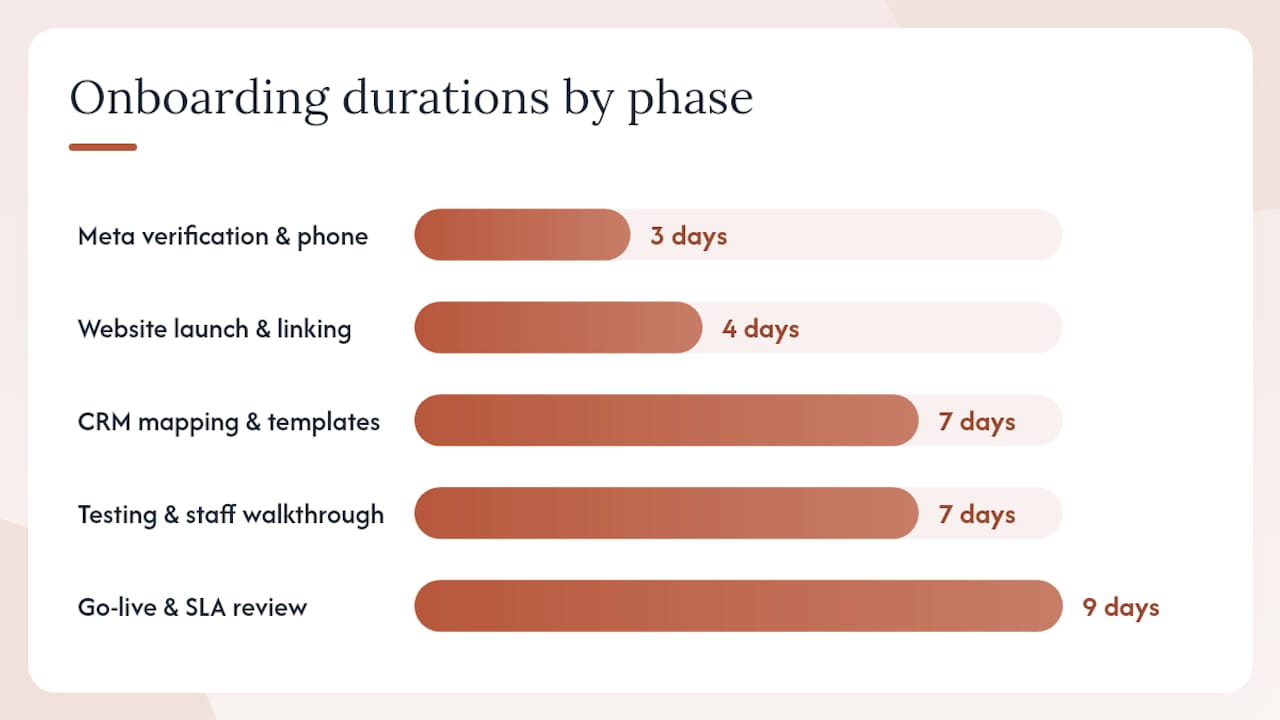
- Days 1–3: Meta Business Manager verification and phone number provisioning.
- Days 4–7: Bilingual website goes live; WhatsApp number linked to the AI receptionist.
- Days 8–14: CRM field mapping, template submission and approval, bilingual flow configuration.
- Days 15–21: End-to-end testing, staff walkthrough, deduplication rule validation.
- Day 22–30: Go-live with monitoring; SLA review at end of first week.
Typical outcomes for practices using the full stack:
- Faster first-response time because the AI receptionist handles inbound messages around the clock, not just during office hours.
- Reduced no-shows from bilingual appointment reminders sent via WhatsApp.
- Improved lead capture for Spanish-speaking clients who previously dropped off when they encountered English-only intake flows.
- Cleaner CRM records because intake data is captured at the conversation level, not entered manually after the fact.
For dental practices specifically, the bilingual front-desk package covers the full WhatsApp provisioning and CRM sync as part of the managed onboarding. Legal practices can find the equivalent setup at Diazluna’s attorney service page.
What building bilingual front-desk integrations actually teaches you
The technical checklist in this guide is accurate, but the harder problem is almost never the API wiring. It is the internal process change.
Most practices that struggle with WhatsApp CRM automation are not failing because of a misconfigured webhook. They are failing because the team still treats WhatsApp like a personal chat app. Agents reply manually, skip templates, and never log the conversation to the CRM because the habit was never built. The API is live; the workflow is not.
The fix is not more training. It is removing the option to work around the system. If agents can reply from their personal WhatsApp, they will. Lock the business number behind the shared inbox from day one, and make the CRM the only place conversation history lives.
Bilingual automation adds another layer. A Spanish-language template that reads like a machine translation does more damage than no automation at all. Clients notice immediately when the tone shifts between the automated greeting and the human follow-up. The solution is to write templates with a native speaker, review them against the conversational tone of your human agents, and treat translation consistency as a quality metric, not an afterthought. The ROI case for bilingual support is clear, but only when the execution is consistent end-to-end.
For rollout, pilot with a single location or one service line. Measure first-response SLA and opt-in capture rate in week one. Both numbers tell you whether the integration is working operationally, not just technically. Capture opt-ins during intake, not after, and store the consent source in the CRM from the first day. Retrofitting consent records is painful and creates compliance exposure.
Diazluna handles the WhatsApp + CRM setup for bilingual practices
Practices that serve Spanish-speaking clients face a specific problem: the technical integration is only half the job. The bilingual layer, the tone, the routing logic, and the template language all require work that generic CRM connectors do not provide.
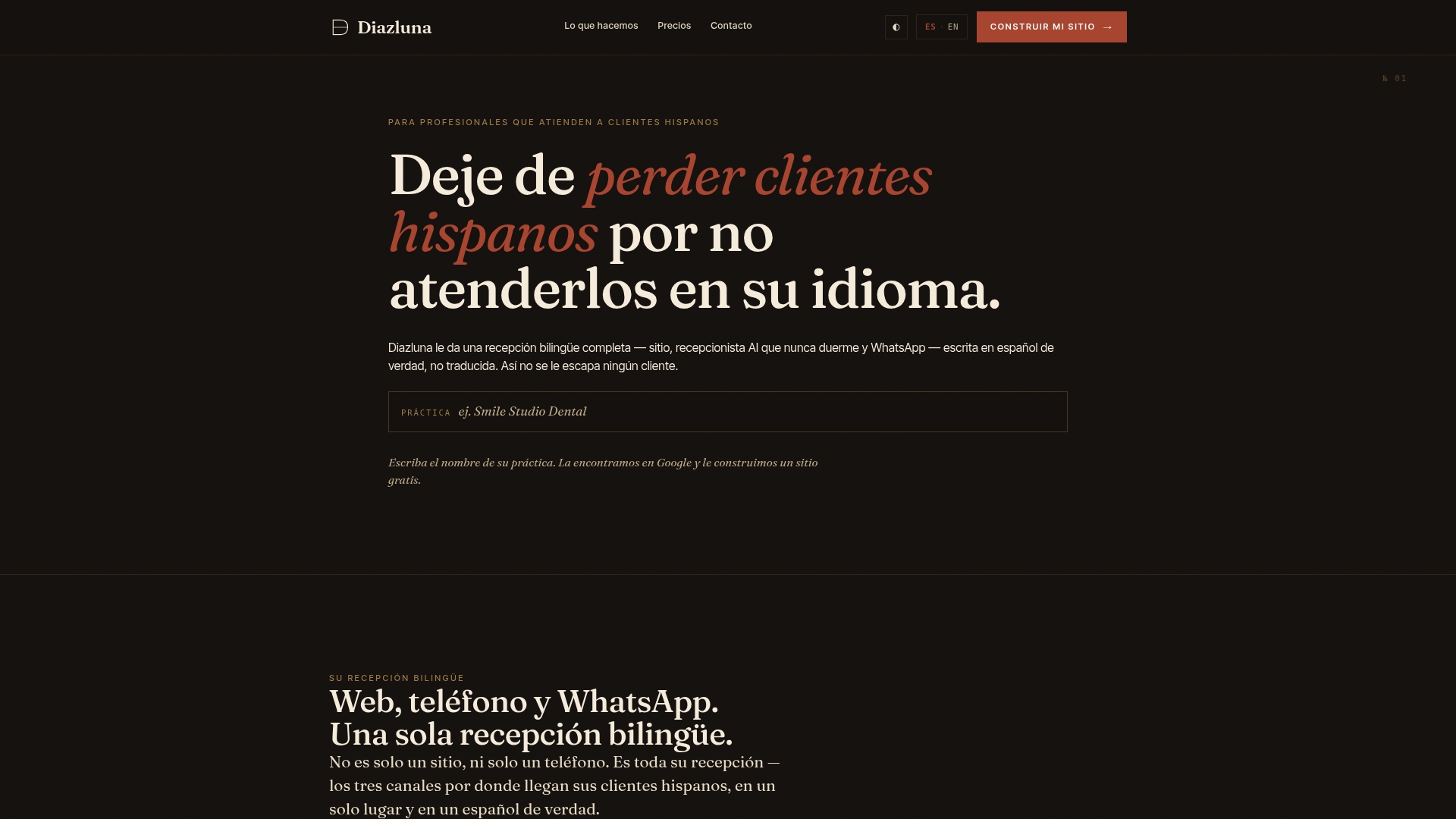
Diazluna’s full-service package covers the entire stack: bilingual website, 24/7 AI receptionist in English and Spanish, WhatsApp provisioning, CRM sync, and managed onboarding. You do not hire a developer, a translator, and a CRM consultant separately. The setup goes live in under 30 days, and the AI receptionist handles inbound WhatsApp messages around the clock from day one, so no Spanish-speaking client hits a dead end after hours.
The first 30 days include Meta Business verification support, phone number provisioning, template submission, field mapping, and a go-live test. After that, the platform runs on a monthly subscription with no long-term contract lock-in.
If your practice serves Hispanic clients and you want WhatsApp integrated with your CRM without building it yourself, see what Diazluna includes for dental practices or visit Diazluna to request a walkthrough of the full bilingual front-desk platform.
Sources
- WhatsApp Business API Integration With Your CRM (Working Setup)
- CRM integration with WhatsApp
- Statista — WhatsApp penetration in Latin America
- WhatsTeam — How to connect WhatsApp to your CRM: Complete Integration Guide 2026